
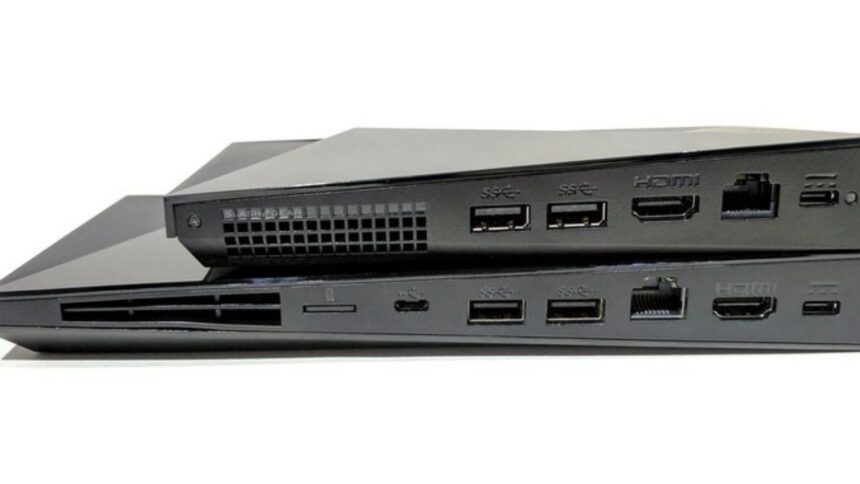
An Nvidia shield serial number is a unique 13-to-15-character alphanumeric code used to identify your specific streaming device. You can find the NVIDIA Shield serial number printed on the bottom of the device, on the original packaging, or by navigating to Settings > Device Preferences > About > Status on your NVIDIA Shield interface.
Every piece of premium consumer electronics relies on unique identifiers to track manufacturing, handle warranties, and provide technical support. The NVIDIA Shield ecosystem of streaming devices is no exception. Whether you own the standard cylindrical NVIDIA Shield TV or the more robust NVIDIA Shield TV Pro, understanding how to locate and use your device identifier is a fundamental part of device ownership.
This comprehensive guide explains exactly what an Nvidia shield serial numberis, why the serial number matters, and how to find the serial number across different NVIDIA Shield models. By following these step-by-step instructions, users can quickly secure their hardware information, perform an NVIDIA Shield warranty check, and troubleshoot common technical issues with confidence.
What Exactly Is an NVIDIA Shield Serial Number?
An NVIDIA Shield serial number is a unique alphanumeric string assigned to a single NVIDIA Shield unit during the manufacturing process. Unlike a model number, which applies to millions of identical units, the serial number acts as a digital fingerprint for one specific device. The Nvidia shield serial number typically consists of a combination of letters and numbers, often spanning 13 to 15 characters.
Manufacturers use the serial number to track the exact production batch, factory location, and hardware revision of the NVIDIA Shield device. Because NVIDIA updates internal hardware components over time without necessarily changing the external design, the serial number tells NVIDIA engineers exactly which components exist inside your specific unit.
Why Is the NVIDIA Shield Serial Number Important?
The NVIDIA Shield serial number serves several critical functions for both the consumer and the manufacturer. Users should record the serial number immediately upon purchasing the device.
The primary reasons the NVIDIA Shield serial number is important include:
- Warranty Verification: An NVIDIA Shield warranty check requires the exact serial number to determine if the hardware remains covered under the standard one-year limited warranty.
- Technical Support: NVIDIA customer care representatives require the serial number to pull up device history, previous support tickets, and specific troubleshooting protocols.
- Device Registration: Registering an NVIDIA Shield device to an NVIDIA account requires the serial number. Registration ensures users receive critical firmware updates and security patches.
- Theft Recovery: If an NVIDIA Shield device is stolen, users can provide the serial number to law enforcement agencies for tracking and recovery efforts.
- Resale Value: Buyers purchasing a used NVIDIA Shield device often request the serial number to verify authenticity and check for remaining warranty coverage.
Where Is the Serial Number Located on NVIDIA Shield TV?
The physical location of the Nvidia shield serial number depends entirely on which hardware model you own. NVIDIA currently offers two distinct form factors: the compact, tube-shaped NVIDIA Shield TV and the console-style NVIDIA Shield TV Pro.
Finding the NVIDIA Shield TV Serial Number (Cylinder Model)
The standard NVIDIA Shield TV features a cylindrical design intended to hide behind a television. To find nvidia shield serial number details on this model, look near the physical connection ports. The serial number is printed in tiny text directly on the black plastic casing, typically situated between the HDMI port and the power input. Because the text is incredibly small, users often need a flashlight or a smartphone magnifying app to read the characters clearly.
Finding the NVIDIA Shield TV Pro Serial Number (Console Model)
The Nvidia shield serial number TV Pro utilizes an angular, flat console design. To locate the serial number on the NVIDIA Shield TV Pro, turn the console upside down. The bottom plate contains an engraved or printed sticker featuring regulatory information, the NVIDIA logo, and a barcode. The serial number sits directly below this barcode, labeled explicitly as “S/N” followed by the alphanumeric string.
How to Check the Serial Number Through Device Settings
If the NVIDIA Shield device is plugged in, connected to a television, and functioning correctly, navigating the software menu is the easiest way to find the serial number. The software method prevents users from having to unplug the hardware or squint at tiny physical text.
Follow these step-by-step instructions to check the NVIDIA Shield serial number via the software interface:
- Turn on the television and ensure the NVIDIA Shield device is awake.
- Using the NVIDIA Shield remote control, navigate to the top right corner of the home screen and select the Settings icon (shaped like a gear).
- Scroll down the menu and select Device Preferences.
- Select the About option at the top of the list.
- Scroll down and select Status.
- Look for the field labeled Serial Number. The unique alphanumeric code displayed here is the NVIDIA Shield serial number.
Finding the Serial Number on the Product Label
If an NVIDIA Shield device will not power on and the physical text on the hardware is illegible due to wear and tear, the original packaging serves as an excellent backup. NVIDIA prints all critical identifying information directly on the retail box.
Locate the original cardboard box the NVIDIA Shield arrived in. Examine the bottom or the lower back panel of the box to find a large white sticker containing several barcodes. The sticker lists the model number, part number, and the serial number. Look for the barcode specifically labeled “S/N.” The characters printed directly below that specific barcode represent the exact serial number matching the enclosed NVIDIA Shield device.
NVIDIA Shield TV vs Shield TV Pro: Serial Number Locations Compared
To simplify the process of locating the identifier, the following comparison table outlines the different methods to find the serial number and their respective advantages.
| Method | Best For | Advantages |
|---|---|---|
| Software Settings | Working devices connected to a TV | Easiest to read; does not require unplugging hardware; highly accurate. |
| Bottom of Shield TV Pro | Unplugged or non-functioning Pro models | Always accessible; clearly labeled under a barcode; requires no power. |
| Port Area of Shield TV | Unplugged or non-functioning Cylinder models | Always accessible; printed directly on the hardware; requires no power. |
| Retail Packaging Box | Devices with scratched hardware labels | Large, legible text; useful if the device is lost, stolen, or completely destroyed. |
| Purchase Receipt / Invoice | Online buyers without the original box | Provides proof of purchase for warranty claims alongside the serial number. |
How to Use Your NVIDIA Shield Serial Number for Warranty Claims
An NVIDIA Shield warranty check is the first step when hardware fails. NVIDIA provides a standard limited warranty that covers manufacturing defects. To initiate a warranty claim, the user must provide the NVIDIA Shield serial number to prove the device falls within the eligible timeframe.
To submit a warranty claim, navigate to the official NVIDIA Customer Care portal online. Select the NVIDIA Shield product category and choose to start a live chat or submit an email ticket. The support form contains a mandatory field requiring the NVIDIA Shield serial number. Once submitted, the NVIDIA system cross-references the serial number with the original activation date. If the system confirms the device is under warranty, NVIDIA support will issue a Return Merchandise Authorization (RMA) to replace the defective unit.
Using the Serial Number for NVIDIA Support and Troubleshooting
Beyond warranty replacements, the NVIDIA Shield serial number is vital for advanced technical support. When users experience persistent software bugs, HDMI handshake issues, or remote control connectivity failures, NVIDIA technicians use the serial number to identify the exact hardware batch.
Certain manufacturing runs may require specific firmware patches. By providing the serial number, the user allows the technician to push targeted updates to that exact NVIDIA Shield device over the internet. Furthermore, if a user needs to escalate a complex troubleshooting case to a higher-tier engineering team, the serial number acts as the reference code for the entire investigation.
What to Do If You Cannot Find the Serial Number
Occasionally, users face situations where the serial number seems completely lost. The retail box might be discarded, the device will not turn on to access the settings, and the physical sticker is rubbed off.
If you cannot find the serial number using traditional methods, review the original purchase documentation. Digital receipts from major retailers like Amazon, Best Buy, or B&H Photo Video sometimes include the serial number directly on the invoice for inventory tracking purposes. If the invoice lacks the serial number, contact the retailer’s customer service department. Retailers often store the serial numbers of premium electronics in their database linked to the customer’s purchase history and can retrieve the information upon request.
Common Issues Related to NVIDIA Shield Serial Numbers
Users occasionally encounter frustrating issues when attempting to read or use an NVIDIA Shield serial number. Understanding these common problems helps streamline the troubleshooting process.
Illegible Physical Labels
The most frequent complaint regarding the NVIDIA Shield TV (cylinder model) is that the physical serial number text is too small and wears off easily if the device is frequently handled. If the physical text is illegible, immediately rely on the software settings method or the original retail box.
Serial Number Not Recognized
Sometimes, a user types the serial number into the NVIDIA support portal, and the system rejects it as invalid. This issue usually stems from misreading the characters. The number “0” and the letter “O,” or the number “1” and the letter “I,” look remarkably similar. Carefully re-examine the serial number and try alternative character combinations if the system flags an error.
Refurbished Device Discrepancies
Buyers of refurbished NVIDIA Shield devices occasionally find that the serial number in the software settings does not match the serial number printed on the retail box. This mismatch occurs when third-party refurbishers place a repaired unit into a generic or mismatched box. Always rely on the serial number displayed within the NVIDIA Shield software settings, as the software identifier is permanently hardcoded into the motherboard.
How to Verify an NVIDIA Shield Device Using Its Serial Number
When purchasing a used NVIDIA Shield device from a secondary marketplace like eBay or Facebook Marketplace, verifying the hardware is crucial. Counterfeit streaming devices exist, and purchasing a stolen unit can lead to the device being blacklisted by NVIDIA.
Before completing a secondhand transaction, ask the seller to provide a photograph of the NVIDIA Shield serial number displayed on the television screen through the software menu, alongside a photo of the physical label. Contact NVIDIA Customer Care and provide the serial number. While NVIDIA cannot share the previous owner’s personal information, representatives can confirm if the serial number is authentic and whether the device is currently flagged as stolen or permanently banned from NVIDIA servers.
Frequently Asked Questions (FAQs)
Does the NVIDIA Shield remote have its own serial number?
Yes, the NVIDIA Shield remote control possesses a separate, unique identifier. To find the remote’s serial number, navigate the NVIDIA Shield interface to Settings > Remotes & Accessories > Shield Accessories > Shield Remote > About. The identifier listed here applies only to the remote hardware.
Can someone hack my NVIDIA Shield if they know my serial number?
No, an NVIDIA Shield serial number alone does not provide unauthorized users with access to your device, network, or personal data. The serial number is strictly a hardware identifier used for warranty, registration, and support logistics.
How long is the NVIDIA Shield warranty valid?
In the United States and Canada, the standard NVIDIA Shield limited warranty lasts for one year from the date of original purchase. Warranty lengths may vary in other regions, such as the European Union, where local consumer protection laws often mandate a minimum two-year warranty.
Why is the serial number on my box different from the device settings?
A discrepancy between the box and the software settings typically means the retail box belongs to a different unit. This happens frequently with used or third-party refurbished devices. Always trust the serial number displayed in the device’s software settings, as it reflects the actual internal motherboard.
Secure Your Device by Knowing Your NVIDIA Shield Serial Number
Finding your NVIDIA Shield serial number is an essential task that takes only a few minutes but provides long-term peace of mind. Whether you check the software settings, examine the physical hardware, or keep the original retail box, securing this 13-to-15-character code ensures you are prepared for unexpected technical failures.
By having the serial number ready, users can swiftly execute an NVIDIA Shield warranty check, streamline communications with NVIDIA technical support, and verify the authenticity of their premium streaming hardware.